One Feed to Rule Them All
2 min read
And in my website bind them
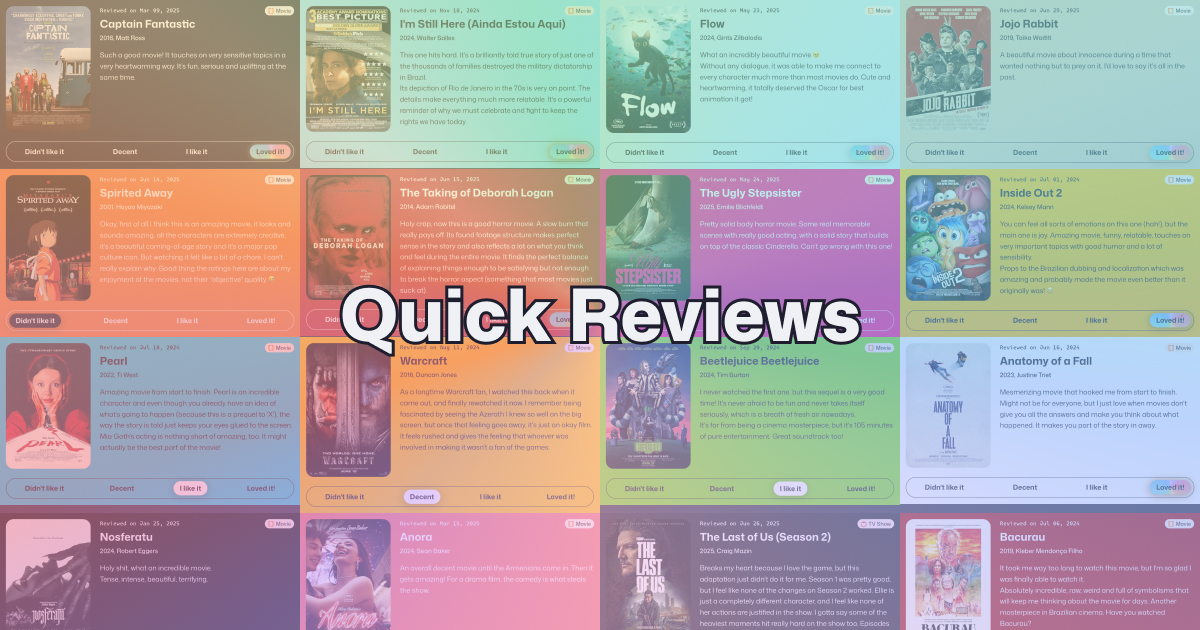
For a little over a year, I’ve been writing quick reviews of movies and TV shows I’ve watched. I was inspired by Matt Birchler on Mastodon and his own Quick Reviews web app, and while I initially used his app to write my own and post to social media, I decided to give my reviews a home in here.
So, after gathering my reviews as Markdown files in Obsidian, they’re now in a new section here. Meet Quick Reviews!
The review cards are not images, but just web elements like everything else. Which means they are responsive and lightweight. I made it as easy as possible to publish them on my side, and there’s even a download button to allow me to quickly post them to social media!
If you’re interested in how I made it work, it’s actually not that complicated.
This website already uses Markdown files for the blog posts, and since it uses Astro, fetching data for the Quick Reviews was as easy as declaring a new Content Collection, pointing to the right folder, and declaring its schema. It will all make sense in a bit.
First of all, I needed to define what a review would look like. Its main pieces of information are the movie/show's name, the rating, and the content of my review. Some metadata is also nice to help tidy things up, like the date I reviewed it, the year the movie came out, and who the director was.
In Markdown, this kind of data is all part of the file's Frontmatter, a special section at the top of the file. The only exception would be the review's content, which is just pure Markdown, right below the frontmatter. It looks like this:
---
type: (movie/tv show)
metadata: (year, director, etc)
image: (movie poster)
rating: (my rating)
date: (when I reviewed it)
---

(what I have to say about it)
With just that, I'm able to display it however I want on my site. I added two extra properties that are specific to how I want to display them on my website: theme, with a light an dark option that mainly control the color of the text, and customBg, which allows me to set any color I want as the background.
On the Astro side of things, I declared this same schema, so Astro knows what data to look for:
import { z } from 'astro:content';
import { QuickReviewRating, QuickReviewType } from './quick-review-types'; // These are enums that match to what's in Obsidian

export const quickReviewSchema = z.object({
	type: z.enum([QuickReviewType.Movie, QuickReviewType.TvShow, QuickReviewType.Game, QuickReviewType.Album]),
	metadata: z.string().optional().nullable(),
	image: z.string().optional().nullable(),
	rating: z.enum([QuickReviewRating.DidntLikeIt, QuickReviewRating.Decent, QuickReviewRating.LikeIt, QuickReviewRating.LovedIt]),
	date: z.coerce.date(),
	theme: z.enum(['dark', 'light']),
	customBg: z.string().optional().nullable()
});
And then, on content.config.ts, I used that schema in my new Content Collection:
import { quickReviewSchema } from "@schemas/quick-review";

const quickReviews = defineCollection({
	loader: glob({ pattern: "**/*.md", base: "./public/cms/quick-reviews" }),
	schema: quickReviewSchema
});

export const collections = { quickReviews };
And with that, I can already use Astro's getCollection to fetch and use that data however I want!
This system is only as good as its ease of adding new reviews to. If adding reviews is too much of a hassle, then my lazy self will just stop doing it.
Obsidian has a built-in Template feature that allows you to quickly add a pre-set structure to a file, like the Frontmatter above. That already makes it better, since I can just create a file, apply the template, and just fill the missing fields. However, some steps were particularly annoying.
Finding a movie's image, year and director usually required either a web search or opening its page in IMDB. That's not really a big deal, but it's still annoying to have to make that trip every time I want to write something.
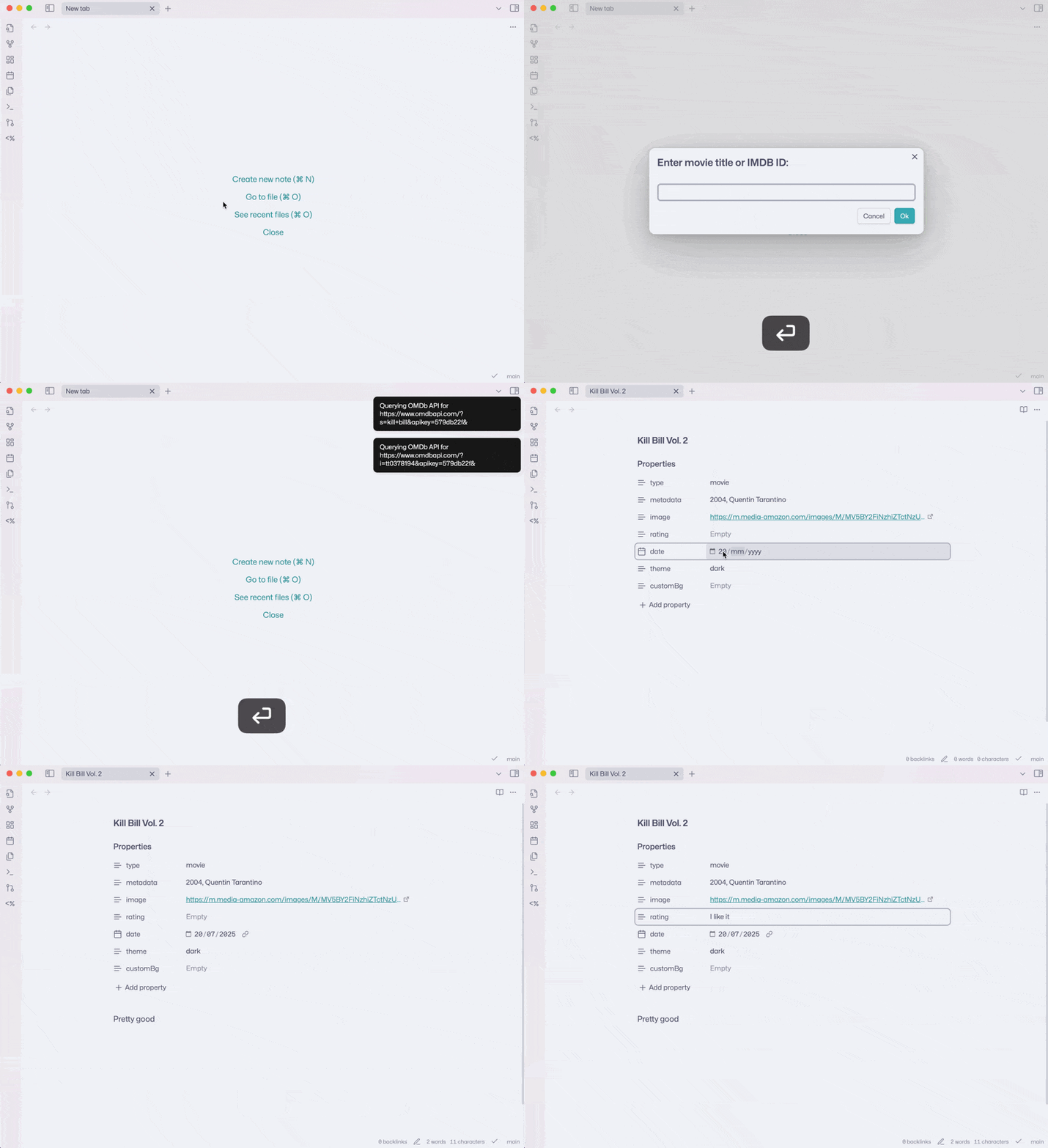
Luckily, Obsidian has a gigantic ecosystem of plugins that can fill any possible niche. There is a community plugin called QuickAdd that adds a bunch of possibilities to templates. And, guess what, the plugin author even has an example of how to setup a template that automatically grabs info from IMDB into a note! I just followed the guide for the Movie & Series script and, voilà, I could have that info in my Quick Reviews in seconds!
I didn't need all that data on my quick reviews, so I just added the ones I needed to my template. The end result looks like this:
---
type: "{{VALUE:type}}"
metadata: "{{VALUE:Year}}, {{VALUE:director}}"
image: "{{VALUE:Poster}}"
rating:
date: ""
theme: dark
customBg:
---
And this is what the flow looks like:
Honestly, I don't want this section to be complicated at all. It is above all a place to dump my thoughts about specific pieces of media on. I added some quick filtering for media type, but that's it. I might revisit the layout of the reviews at some point and maybe add a special RSS feed for them, but besides that, I think I'm done.
Let me know if there's anything you think would be cool, though. As long as it's fun, I'm not opposed to it!
One Feed to Rule Them All
2 min read
And in my website bind them
2025: A Big Year
13 min read
The craziest year of my life.
A new home for Cool Links
2 min read
Or more of a new room in the same home, I guess
Fantinel.dev v5 is here!
10 min read
Out with the green waves, in with the rainbow of pastel colors!