The Open Web and "the masses"
6 min read
A rant about the Open Web and how it is not for everyone - but that's okay.
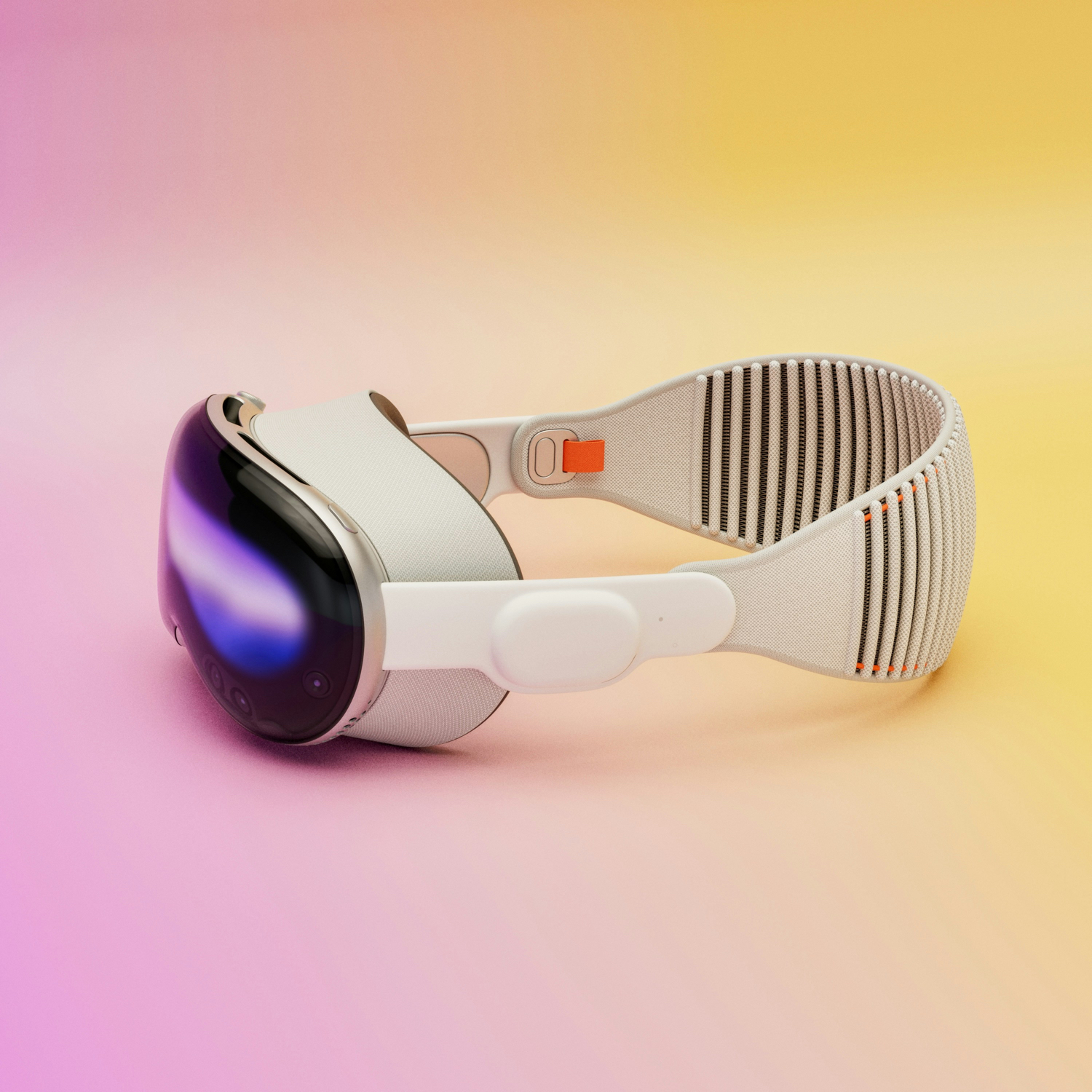
While in Chicago and during a massive heat wave, I ended up going inside an Apple Store, mostly looking at a place with A/C to chill for a bit.
In there, a guy was giving out a quick presentation on the Vision Pro and mentioned there being demo slots available, so I thought why not? The demos usually take 30 minutes and it’d be cool to try out this device I’ve heard about but never had the chance to try.
For the record, the Apple Vision Pro is not currently available where I live (Brazil), and its price point ($3500) is a major turn off anyway, so I was never interested in buying it. Still, I like gadgets and was really interested in checking it out.
And… yeah, the wow factor is definitely there! The demo is fully guided and of course they take you through its most impressive features. The immersive videos and “interactive” experiences are really something - it really felt like things were right in front of me, in a not-3D-glasses way. The brain was really struggling to understand some of the things were not real.
The Vision Pro has no controller or anything similar, so you basically control and navigate the UI just using your eyes and your hands. You look at something and it will get highlighted (kinda like hovering a mouse cursor over something), and then you pinch 👌with any hand to “click” on stuff.
For me, it worked really well! I’ve seen some people saying it can be hit and miss sometimes, but I felt it quite responsive in my short time using it.
One thing that would probably be an issue though: you have to be looking exactly at where you’re clicking. Which means your eyes have to stay in sync with your hands all the time. This seems natural at first, but once you start trying to do things more quickly, you realize that’s not how you usually do things in other devices.
Try, for example, resizing or moving a window on your computer. Your eyes go to the corner of the window as you drag the mouse cursor there, but before you click, the eyes are already moving to where you want the window to be dragged to. That’s natural, as our eyes are looking for the next thing to do while our hands are still doing the action.
With the Vision Pro, that doesn’t work. Your eyes can’t be faster than your hand, they have to be the exact same speed, otherwise you will be interacting with the wrong thing.
The headset itself is pretty well made and is built with premium materials, as you’d expect from Apple. Nothing new there. But the first thing you notice when putting it on is that it is heavy. Not heavy enough to stop your head from staying straight, of course, but heavy enough for it to start to weigh down after a while.
After 30 minutes wearing it, I started to feel the weight on my neck, and I had a pretty clear “headset mark” on my face. I didn’t get any problem with my eyes, though I imagine they would get irritated more easily than with regular screens, since they’re pretty much glued to your face.
Which means, I don’t seriously think you can wear the Vision Pro for long periods of time. And I think Apple knows this, since they went for a 2h battery only. Good for a movie maybe, bad for a work session. And speaking of work…
Apple did showcase some hypothetical work situations in their Vision Pro videos, but it’s very hard to imagine someone using it for work seriously. It is technically impressive, sure, and some “what ifs” are really exciting to think about.
But when doing actual work, you want reliability, speed and flexibility. I don’t think it provides any of those.
It’s not reliable or fast because of the control issues I mentioned before. It feels like your mind has to slow down to catch up with the Vision Pro, whereas it feels like computers have caught up in speed with our minds (or did we just get used to them?).
It’s not flexible because, in the end, it runs another closed-down platform, VisionOS, which faces the same issues the iPadOS has. Great if all you do is use App Store stuff, but whenever you need something else that Apple doesn’t allow for any reason (like a clipboard manager or any tweaks to the OS itself), then you’re out of luck. There’s a reason the Mac is still the work OS for most.
Speaking of Mac, you can actually sync it with the Vision Pro and use it as an external monitor, in which you can make the screen as big as you want. I wasn’t able to see that on the demo, but honestly, even if it’s good I doubt it’s $3500 good.
To sum up my first impressions, I think it’s technically amazing, and the nerd side of me was pretty excited using it. It’s a great entertainment device (as long as you’re ok only watching what’s available), although a lonely one.
But yeah, that price point just makes it hard to be positive about it 😬
The Open Web and "the masses"
6 min read
A rant about the Open Web and how it is not for everyone - but that's okay.
Iron Maiden's "Killers" is a concept album
12 min read
Seriously, hear me out
Open Source x Free Software: What's the difference?
3 min read
Learn the difference between these two terms that often get mixed up.